


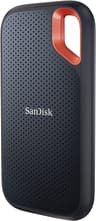


Why a 2,000 MB/s drive runs at half speed on a Mac
Drives rated at 2,000 MB/s, such as the Samsung T9 and WD_Black P40, use USB 3.2 Gen 2x2 (20Gbps). Macs do not support that mode, so these drives fall back to 10Gbps and run at roughly 1,000 MB/s, the same as a SanDisk Extreme or Crucial X9. They still work well, but you are paying for speed a Mac cannot use.
If you want more than 1,000 MB/s on a Mac, you need a Thunderbolt or USB4 (40Gbps) drive. A 40Gbps NVMe enclosure with an M.2 SSD inside connects to the Thunderbolt or USB4 ports on Apple silicon Macs and runs several times faster than a 10Gbps drive.
Formatting for Mac and Time Machine
Most portable SSDs ship formatted as exFAT, which works on both Mac and Windows. If the drive will only be used with Macs, reformatting it as APFS in Disk Utility gives you better reliability and support for macOS features. Time Machine uses APFS on current versions of macOS and will offer to erase and reformat a drive when you set it up as a backup disk, so use a dedicated drive for backups.
Extra space for a MacBook
MacBook storage cannot be upgraded after purchase, so a portable SSD is the usual way to add space. It is a good home for a large Photos library (Apple recommends an APFS-formatted drive), video projects and anything you do not need on the internal drive every day. For a Mac that stays on a desk, a larger drive such as the Crucial X10 6TB can hold years of photos and backups.