Skip to content
SmartValueLab
DealsBest PicksBlog
CompareBest Picks

Get Weekly Deals

Best-value tech products delivered every week. No spam, unsubscribe anytime.

Weekly deals & value picks. No spam, unsubscribe anytime.

SmartValueLab

Find the best tech deal. Every price. Every product.

Categories

  • SATA SSD
  • NVMe SSD
  • HDD
  • External SSD
  • NAS Drive
  • GPU
  • CPU
  • Monitor
  • External HDD
  • Memory Card
  • USB Drive
  • RAM
  • Motherboard
  • Power Supply
  • CPU Cooler
  • PC Case
  • Router
  • Mesh WiFi System
  • NAS System
  • Webcam
  • Microphone
  • Capture Card
  • Smart Camera
  • Video Doorbell
  • Smart Hub
  • Smart Plug
  • Gaming Monitor
  • Gaming Keyboard
  • Gaming Mouse
  • Gaming Chair
  • Gaming Headset
  • Monitor Stand
  • Gaming Laptop
  • Video Editing Laptop
  • HDMI Cable
  • USB Hub

Buying Guides

  • Best Storage for Gaming PCs
  • Best SSDs for PS5 Expansion
  • Best Storage for Xbox Series X/S
  • Best External SSDs for Mac
  • Best Storage for Video Editing
  • Best Storage for Photographers
  • Best Storage for Content Creators
  • Best NAS Drives for Home Use
  • Best Storage for Business Backup

Tools & Picks

  • Deals & Price Drops
  • Compare Products
  • All Best Picks
  • Best NVMe SSDs
  • Fastest NVMe SSDs
  • Budget NVMe SSDs
  • Buying Guides
  • Tech Blog
About UsContactEmail PreferencesPrivacy PolicyCookie PolicyTermsAffiliate Disclosure

Affiliate disclosure: As an Amazon Associate, SmartValueLab earns from qualifying purchases. We are a participant in the Amazon Services LLC Associates Program, at no extra cost to you. Prices are updated periodically and may differ from those shown. See our full disclosure.

© 2026 SmartValueLab. All rights reserved.

  1. Home
  2. Microphone

Best Microphone Prices

USB and XLR microphones for streaming, podcasting, and recording. 4 products.

Last updated today

Daily from Amazon

Microphone Buying Guide

Editor's Note

Room acoustics determine how good your microphone sounds more than the microphone itself. A $100 dynamic mic (Rode PodMic, Shure SM7B) in a hard-walled, reflective room sounds worse than a $50 condenser mic in a carpeted bedroom with soft furnishings. Dynamic microphones reject room noise — they're the right choice for untreated rooms or rooms with HVAC noise. Condenser microphones have higher sensitivity and capture more detail, but they amplify background noise equally. The Shure SM7B is the streamer's standard dynamic mic, but the Rode PodMic USB gives 90% of the performance at half the price.

— Zoltan Lukacsi, SmartValueLab

Editor's Pick

Rode PodMic USB

Dynamic cardioid microphone with USB-C connectivity — no audio interface needed. Rejects background noise better than any condenser at this price, delivers broadcast-quality vocal clarity for streams and podcasts, and the internal headphone amp for zero-latency monitoring eliminates the main complaint about USB recording setups.

See Pick →

Budget

USB condenser for podcasting, $80-150

Mid-Range

Professional USB or XLR for streaming, $150-300

Premium

High-end studio mics for production, $300+

Common Mistakes to Avoid

  • ⚠Buying a condenser microphone for a noisy or reverberant room — condenser mics pick up everything including keyboard noise, HVAC hum, and room echo; dynamic mics reject off-axis noise and are the right choice for most home setups
  • ⚠Forgetting that XLR mics need an audio interface — the Shure SM7B and many pro mics are XLR-only; without an interface like the Focusrite Scarlett Solo, they cannot connect to a computer at all
  • ⚠Placing a USB microphone too far away — cardioid mics lose vocal presence rapidly with distance; position the mic 4–6 inches from your mouth, slightly off-axis to reduce plosive sounds (the 'p' and 'b' problem)

Specs Explained

  • USB vs XLR Microphones →
  • Microphone Types Explained →
  • Audio Quality Factors →

Related Use Cases

  • Podcast Setup →
  • Streaming Audio →
Price:

4 Microphone drives

Sort:
#ProductCapacityReadWriteTBWWarrantyScore$/TBPriceBuy
1
Shure SM7B Dynamic Mic
Shure SM7B Dynamic MicBest value
Shure
————2 years86.8

Related Resources

Best Streaming Mics →Microphones Under $150 →Guide: Best Microphones for Streaming & Podcasting in 2026 →Guide: Best USB Microphone Under $200: Streaming & Podcast Quality →Best Microphone for Streaming and Podcasting in 2026 →video editing storage →photography storage →creator storage →
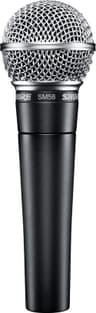
$0.00/TB
$439.00
Check Price on Amazon
2
Rode PodMic USB Dynamic Microphone
Rode PodMic USB Dynamic MicrophoneBest value
RODE
————2 years86.8$0.00/TB
$190.00
Check Price on Amazon
3
Audio-Technica AT2020 XLR Condenser Mic
Audio-Technica
————1 year84.8$0.00/TB
$119.00
Check Price on Amazon
4
Blue Yeti USB Microphone
Blue
————1 year84.8$0.00/TB
$109.99
Check Price on Amazon

Frequently Asked Questions

USB vs XLR microphone — which should I get?

USB mics (Blue Yeti, HyperX QuadCast) plug straight into your computer — simple, no extra gear, great for beginners and most streamers. XLR mics (Shure MV7X) need an audio interface or mixer but offer higher ceiling, better upgrade paths, and pro-grade sound. The Shure MV7 cleverly does both. Start with USB unless you already have an interface or want broadcast quality.

Condenser vs dynamic microphone for streaming?

Dynamic mics (Shure MV7) reject background noise and room echo — ideal for untreated rooms, noisy setups, and close-mic broadcast sound. Condenser mics (Blue Yeti, HyperX QuadCast) are more sensitive and detailed but pick up more room noise and keyboard clatter. For most home streamers in untreated rooms, a dynamic mic gives cleaner results.

What's the best budget streaming microphone?

The HyperX QuadCast and Blue Yeti are the long-standing value champions — solid sound, built-in stands, and useful features (gain control, mute, multiple polar patterns) under $150. For broadcast-grade voice on a budget, the Shure MV7X (XLR) paired with a cheap interface is hard to beat. Our Value Score ranks them by audio quality per dollar.

Do I need a boom arm for my microphone?

A boom arm is not required but dramatically improves results. Mounting a mic on a boom arm lets you position it 4–6 inches from your mouth at an angle — the ideal distance for dynamic mics (Shure MV7). Without a boom arm, desk-stand mics pick up keyboard vibrations and desk noise through the stand. Affordable boom arms (Rode PSA1 ~$100, Heil PL-2T ~$60, Amazon Basics ~$20) all work; the Amazon Basics option is adequate for light studio use.

What polar pattern do I need for streaming?

Cardioid is the correct polar pattern for solo streaming — it captures audio from directly in front and rejects sound from the sides and rear, reducing background noise and room echo. Bidirectional picks up front and back (for interviews). Omnidirectional picks up all directions — good for podcasts with multiple people. Most USB streaming mics default to cardioid, but multi-pattern mics (Blue Yeti, HyperX QuadCast) let you switch. Stick with cardioid for gaming and solo streaming.

What sample rate and bit depth should I record at for streaming?

For streaming and podcasting: 44.1 kHz or 48 kHz at 16-bit is sufficient — Twitch, YouTube, and Spotify compress audio anyway, and the difference between 16-bit and 24-bit is inaudible in compressed delivery. For professional podcast editing with heavy noise reduction: 24-bit 48 kHz gives more headroom for processing. Most USB microphones (Blue Yeti, HyperX QuadCast) record at 16-bit 48kHz by default, which is entirely adequate.