Buying Guide

Best Storage for Photographers

Photographers need storage that's fast enough to ingest cards quickly, durable enough for field use, and portable enough to carry in a camera bag. All drives below meet those requirements — with IP-rated water resistance where available.

Top picks — ranked by value score

#ProductScore
172.5
271
360.1
457.3
557.1
650.8
750

Prices updated daily from Amazon. Value Score combines price/TB, speed, endurance, and warranty.

Your card reader sets the offload speed

When you copy photos off a memory card, the card and its reader are usually the bottleneck, not the SSD. A UHS-II SD card reads at up to about 300 MB/s, so a full 64GB card takes around three to four minutes, and UHS-I cards are several times slower. Any portable SSD rated around 1,000 MB/s is fast enough for SD offloads; faster CFexpress cards are where a quicker SSD starts to matter.

Built for the camera bag

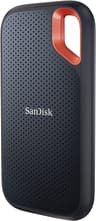
For field work, durability matters as much as speed. The SanDisk Extreme has a rubberized shell with an IP65 dust and water resistance rating, and it is one of the best-reviewed portable SSDs on Amazon. Keep a drive that small in the camera bag and you can back up every card the same day.

Keep two copies before you format a card

Photographers follow the 3-2-1 backup rule: three copies of important files, on two different types of storage, with one kept offsite. On a trip, the practical version is to copy each card to a portable SSD and keep the card until a second copy exists, on a laptop, a second drive or cloud storage. At home, a large hard drive or NAS holds the full archive.

Frequently Asked Questions

How much storage do photographers need?

RAW files from modern mirrorless cameras are typically 25 to 60MB each. A 1TB drive holds roughly 17,000 to 40,000 RAW files. For a two-week trip shooting 500 to 1,000 images per day, 1TB is a comfortable minimum; if you shoot video too, start at 2TB.

Is an external SSD better than an SD card for photo backup?

Yes. A portable SSD costs far less per gigabyte than memory cards of the same capacity and is better suited to holding a backup copy. Offload speed is set by the card and reader: a UHS-II SD card reads at up to about 300 MB/s, so a 64GB card takes around three to four minutes, well within what any USB 3.2 Gen 2 SSD can accept.

Recommended products

Learn more