Best microSD Card for Dash Cams in 2026: Why Endurance Matters
Regular microSD cards fail in dash cams within months. What high endurance means, how to size your card, and the one pick built for loop recording.
The short answer
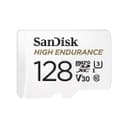
Use a purpose-built high endurance card. The SanDisk 128GB High Endurance microSD is rated for 10,000 hours of continuous recording and costs about $37 at the time of writing. General-purpose cards record fine initially but are not rated for the overwrite cycles dash cams generate every day. The difference shows up in months, not years. More on why below.
Why regular microSD cards fail in dash cams
Dash cams record in a continuous loop. When the card fills up, the oldest footage is deleted and new footage overwrites the same physical NAND cells immediately. This creates thousands of program/erase cycles per year on the same memory blocks. Consumer microSD cards are designed for cameras and phones that write data occasionally: a burst of photos, a video clip, a software update. They are not rated for uninterrupted write workloads.
On dash cam forums, reports of standard cards failing within 6–12 months of daily use are common. The failure mode is usually silent: the card stops recording or corrupts footage without any warning light on the dash cam. The practical risk is pulling your card after an incident and finding no file, or a file that will not play.
What "high endurance" actually means
High endurance microSD cards differ from standard cards in three measurable ways:
- Rated recording hours: SanDisk rates the High Endurance 128GB at 10,000 hours of continuous video, a figure it publishes specifically for loop-recording workloads. Standard cards carry no equivalent rating.
- Controller and wear leveling: High endurance cards use controllers tuned for write-heavy workloads with stronger wear leveling that distributes writes evenly across all NAND blocks. Standard cards optimize for peak read speeds, not write cycle distribution.
- Warranty scope: SanDisk's High Endurance carries a 2-year warranty that covers dash cam use. Standard cards typically carry longer warranties (5–10 years) but the terms often exclude damage from abnormal operating conditions. Continuous loop recording can fall into that exclusion with a general-purpose card.
How much capacity do you need?
The table below uses approximate bitrates typical for consumer dash cams. Real bitrates vary by make, model, and quality setting, so use this for rough planning.
| Resolution | Approx. bitrate | 64GB stores | 128GB stores |
|---|---|---|---|
| 1080p | ~10–12 Mbps | ~12 hours | ~24 hours |
| 2K (1440p) | ~18–22 Mbps | ~6–7 hours | ~13–14 hours |
| 4K | ~35–45 Mbps | ~3–4 hours | ~6–8 hours |
For most drivers recording at 1080p, 128GB is the practical choice: it stores a full day of driving before the loop starts overwriting. If you want footage from a longer window, such as a road trip or a week of commutes, buy the largest capacity your dash cam supports. Most cameras cap at 128GB or 256GB; check the spec sheet before buying.
Format and replace intervals
Format using the dash cam's own format function, not your PC. Dash cams write proprietary file structures; formatting via Windows or macOS can cause the camera to fail to read the card on next boot. Format every 2–4 weeks for daily drivers. This rewrites the file allocation table cleanly and is faster and more effective than deleting individual clips.
With a high endurance card rated at 10,000 hours, the practical replacement trigger is symptoms, not a calendar date. Watch for: the dash cam reporting a card error, recordings that fail to play, or the camera failing to detect the card on startup. At typical driving patterns of 1–2 hours per day, you will not reach the rated endurance limit before these symptoms, if they appear at all.
Best picks
| Card | Capacity | Endurance rated? | Price (approx.) |
|---|---|---|---|
| SanDisk High Endurance | 128GB | Yes, 10,000 hours | ~$37 |
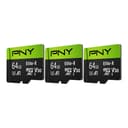
| PNY Elite-X 3-Pack | 3 × 64GB | No | ~$40 |
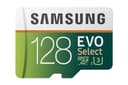
| Samsung EVO Select 128GB | 128GB | No | ~$25 |
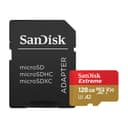
| SanDisk Extreme 128GB | 128GB | No | ~$60 |
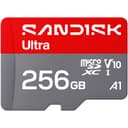
| SanDisk Ultra 256GB | 256GB | No | ~$60 |
The Samsung EVO Select, SanDisk Extreme, and SanDisk Ultra are solid general-purpose cards with fast read speeds and long warranties. They will record video in a dash cam. None is rated for continuous loop recording, and their warranty terms may not cover that use case. The SanDisk High Endurance costs $12 more than the EVO Select for the 128GB size. For a dash cam or security camera running all day, that $12 is the right call.
The PNY Elite-X 3-Pack provides three 64GB cards for ~$40. Rotating three cards and keeping one as a backup is a viable strategy for someone who wants a spare on hand, though none of the three is endurance-rated.
For general microSD comparisons covering Nintendo Switch, action cameras, and phones, see the best microSD card guide.
Home security cameras
Security cameras record motion events rather than continuously in most configurations, which reduces write cycles compared to a dash cam. A high-traffic outdoor camera recording all-day motion can still generate substantial write load, however. The same logic applies: a high endurance card is the correct choice for cameras running 24/7 or in high-activity areas.
Cameras in the catalog that support microSD local storage include the Wyze Cam v4, Wyze Cam v3, Tapo C120, Tapo C210P2, and Kasa EC70. All support local microSD recording as an alternative to cloud storage subscriptions. Check each product page for the maximum supported card size before buying.
Compare memory cards →
microSD and SD cards ranked by speed, endurance rating, and price per GB.
Frequently Asked Questions
What microSD card should I use in a dash cam?
The SanDisk 128GB High Endurance microSD is rated for 10,000 hours of continuous recording and costs about $37. It is the only purpose-built endurance card at this price. General-purpose cards like the Samsung EVO Select work initially but carry no manufacturer guarantee for continuous loop recording. At 1–2 hours of driving per day, the SanDisk High Endurance reaches its rated endurance limit in over 13 years.
Will a regular microSD card work in a dash cam?
In the short term, yes. A standard card records normally. The problem is longevity: regular microSD cards are rated for occasional writes, not the thousands of program/erase cycles that loop recording creates. Specific failures include corrupted files, cards that stop recording mid-trip, and outright card failure. These are common within 6–12 months of heavy daily use. High endurance cards use a reinforced controller to handle this workload.
How long does a microSD card last in a dash cam?
The SanDisk 128GB High Endurance is rated for 10,000 hours of recording. At 1 hour of driving per day, that is over 27 years of rated life. General-purpose cards carry no endurance rating for continuous recording, so their lifespan in a dash cam varies widely with driving hours, temperature and the specific card.
How often should I format my dash cam SD card?
Format every 2–4 weeks using the dash cam's own format function, not your PC. The dash cam writes a specific file structure; formatting via Windows or macOS can cause compatibility issues. Formatting is faster and more effective than deleting individual clips. Many dash cams include a scheduled format option in settings.
What size microSD card do I need for a dash cam?
At 1080p, 128GB stores roughly 24 hours of footage before the loop overwrites, giving you a long window to retrieve an incident. At 2K, that window shrinks to about 13–14 hours; at 4K, to 6–8 hours. For 4K recording, 128GB is the minimum useful size. Check your dash cam's spec sheet for the maximum supported capacity before buying.